

Purchasing a subscription for an additional set of devices
Before You Begin
Make sure you have the following ready:Subscriptions are licensed per set of devices. Each additional set requires its own subscription and its own activation code.
For the Administrator
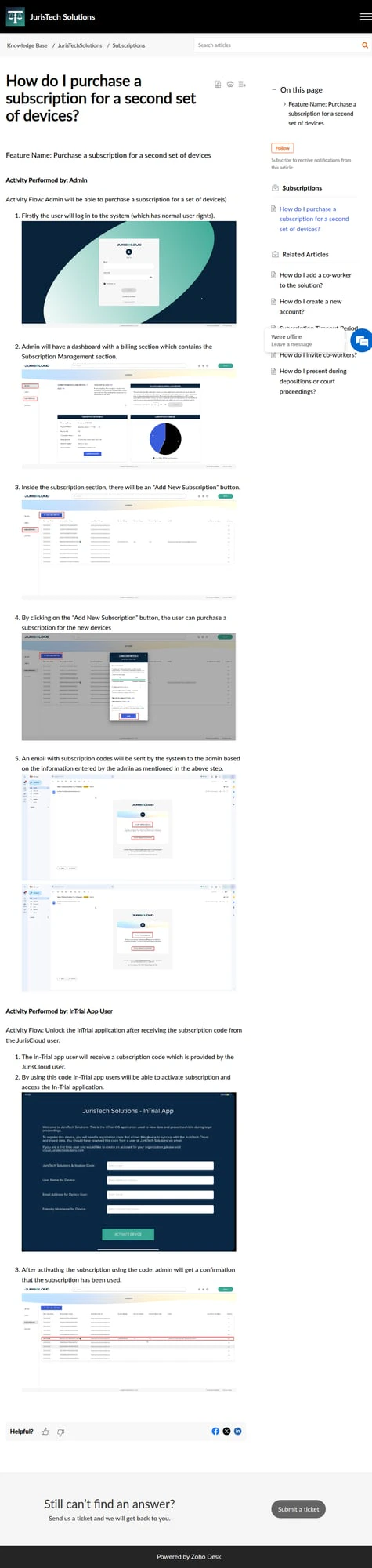
As an administrator, you can purchase a subscription for an additional set of device(s) from within JurisPrep. Once the purchase is complete, JurisPrep generates a subscription code that you pass along to the person using the new devices.1
Sign in to JurisPrep
Log in to your JurisPrep account using your administrator credentials.
2
Open the subscriptions area
Navigate to the subscriptions section of your account to manage and add device licenses.
3
Purchase a subscription for the new device set
Choose to add a subscription for an additional set of devices and complete the checkout.
4
Retrieve the subscription code
After the purchase is confirmed, JurisPrep provides a subscription code. Share this code with the JurisTrial app user who will activate the new devices.
Detailed step-by-step screenshots for this section are being finalized.
For the JurisTrial App User
Once you receive the subscription code from the JurisPrep user, you can unlock the JurisTrial application on your device.1
Open JurisTrial
Launch the JurisTrial application on the device you want to activate.
2
Enter the subscription code
When prompted, enter the subscription code provided by your administrator.
3
Unlock the application
Confirm the code to unlock JurisTrial. The application is now activated for use on this set of devices.
Detailed step-by-step screenshots for this section are being finalized.
Related Articles
Managing Subscriptions
Review and manage the subscriptions on your account.
Activating JurisTrial
Step through unlocking the JurisTrial app on a new device.